Resetting a mailbox password
Need a webmail password reset for a mailbox? This guide shows cPanel users how to reset webmail password access for an email account, then sign back in through the Webmail portal.
This guide is for cPanel users who need to reset a webmail password for an email mailbox, usually because the mailbox user has forgotten it. A cPanel account is different from a Webmail account: if you know your current password and only want to change it, follow our guide to changing your Webmail password instead.
How to complete a webmail password reset in cPanel
First, start by logging in to your control panel. This is typically available via cpanel.yourdomain.com, replacing yourdomain.com with your account's primary domain name.
Once logged in, find the Email -> Email Accounts link. This is usually near the top, although it may be further down depending on your account's setup.
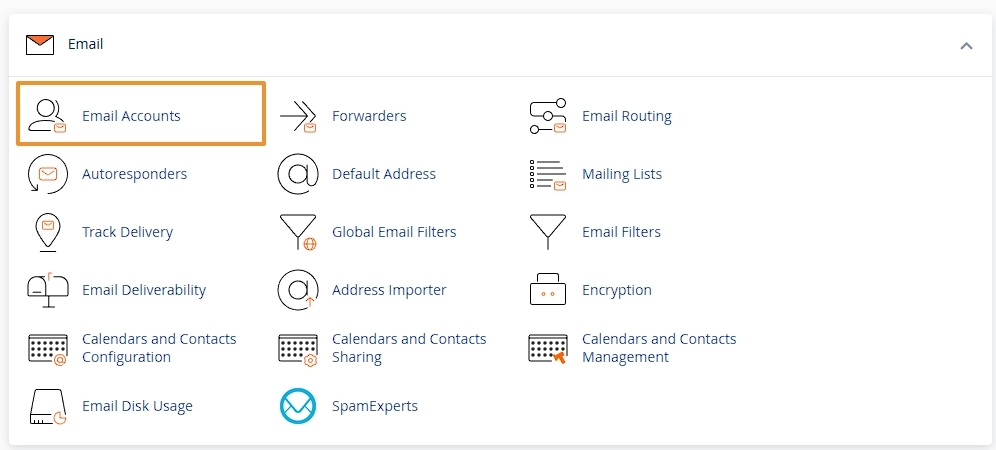
Find the email account you'd like to reset the password for, using the search bar above the table if you have a lot. Then click the Manage button for the correct email account.

This will display a form that allows you to make various changes to the email account settings. Under the Security heading is a New Password field. Enter the new password, or use the Generate button to create a secure password, then click Update Email Settings at the bottom of the form. Please note that if the password is not secure enough, it cannot be saved. Once this is done, the user can log in with the updated webmail password and change it again via the Webmail portal.
Frequently Asked
Questions
Here are some FAQs relating to resetting a mailbox password.
Can I reset a webmail password without the old password?
Yes, providing you have access to the main cPanel account. If you are no the primary account admin, then you'd need to get in touch with your account admin to reset the password for you.
What should the mailbox user do after the password reset?
If you've recently had your password reset on your mailbox, the first step we'd always recommend (unless you're the one that reset it) is to login to the webmail portal, and change the password to something you'd remember.
Is this the same as changing the cPanel password?
No, webmail accounts are separate to cPanel accounts, and will have their own passwords. Webmail only allows access to the Webmail portal which provides functions to manage your email account.
Related Articles
Accessing your webmail
All of our shared hosting packages come with a feature-rich Webmail portal. Here is how to access it.
Access your email on your phone or another email client
Configuration to access your email from your phone or another email client.

Adding a new email mailbox in cPanel
Adding and managing your email mailboxes is important as your business grows. It's straightforward in cPanel.